
Processes that finish themselves.
Most automation stops at the hard part, the exception, the missing field, the email that does not fit the template. We orchestrate the whole process, using rules where the work is predictable and AI where it is not, so the queue empties.
Automation fails in the exceptions, and exceptions live in your building.
The happy path is the easy half. What decides whether an automation is trusted is what happens to the fifteen per cent that does not fit, and nobody discovers those from a process document. We staff this work with forward deployed engineers: embedded in your team, accountable for the outcome, present when it meets real data.
Sitting with the people who do the work
The undocumented step, the customer who always phones, the spreadsheet that is load-bearing. A workshop finds none of these; a fortnight beside the team finds all of them.
Accountable for the process, not the ticket
Measured on whether the work stops arriving in somebody's inbox. That is a different success condition from a closed sprint, and it changes decisions.
Allowed to say the process is wrong
A meaningful share of automation briefs describe a process that should be removed instead of automated. An embedded engineer will say so; a supplier billing by the ticket has no reason to.
There when the exceptions arrive
The first month in production is when the real cases appear. Having somebody who already knows the process is the difference between tuning and rework.
Your operations people, in the loop
They own the exception queue afterwards, so they help design it. An automation the operators do not trust gets quietly worked around.
Where it does not apply
A stable, well-documented, high-volume process is ordinary delivery work and should be priced as such. We will tell you which one yours is.
Automating 80% of a process saves almost nothing.
Classic automation handles the clean cases and hands everything else to a person. That sounds like a win until you look at where the time goes: the 20% of cases that fall out are the ones that took the longest anyway.
Worse, the fallout arrives without context. Someone has to work out what the robot did, how far it got, and what state the record is now in, which frequently costs more than doing the case manually from the start.
The fix is not a smarter robot. It is an orchestration layer that owns the whole process: it knows what stage every case is at, retries what should be retried, interprets what does not fit a rule, and escalates with the work already assembled.
That layer is what we build. Rules-based steps stay rules-based, because they are cheap and provable. AI is added only at the steps that genuinely need judgement.
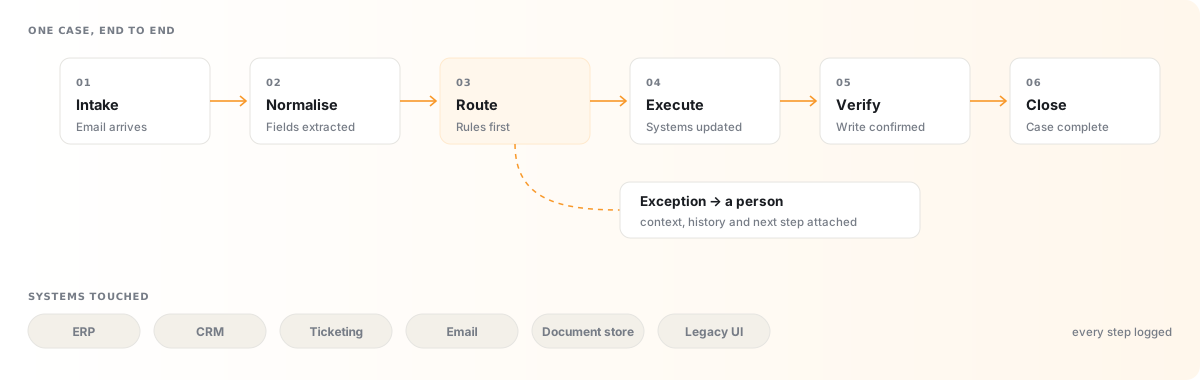
One case, from arrival to closed.
Every case entering the process is tracked through the same six states, whether it completes in four seconds or sits waiting for a person for two days. That single piece of bookkeeping is what makes the difference between automation and orchestration.
The branch matters as much as the line. Anything the process cannot finish leaves with its history attached, so the person picking it up starts from what is known rather than from a half-updated record and a guess.
Not every step deserves a model.
Putting AI where rules would do is the most common and most expensive mistake in this category. We make the call step by step, not process by process.
Rules, with an approval gate
Deterministic logic, plus a person confirming anything irreversible. Payments and deletions live here.
AI, with a person deciding
The model assembles and recommends; a human makes the call. Judgement is assisted rather than replaced.
Rules / RPA, unattended
Effectively free to run and auditable without explanation. Adding a model here costs money and removes certainty.
AI, running autonomously
Where agents earn their cost, messy input, tolerable failure, and volume high enough for the saving to matter.
Six processes that clear their cost fastest.
High volume, well-bounded, and currently spread across several systems and a spreadsheet nobody wants to own.
Order & invoice processing
Read incoming documents, match them to purchase orders, post what reconciles and queue what does not.
ERP · email · document storeCustomer request handling
Classify, enrich and action routine requests end to end, escalating anything that needs a decision.
Ticketing · CRM · knowledge baseEmployee onboarding & offboarding
Provision accounts, assign equipment, trigger training and close everything down cleanly on exit.
HR system · identity · asset registerFinancial reconciliation
Match transactions across banking feeds and ledgers nightly; present only genuine breaks.
Banking feeds · ERP · ledgerRegulatory & internal reporting
Assemble recurring submissions from live data on a schedule, with a review step before anything is filed.
Data warehouse · BI · filing portalsData migration & synchronisation
Keep records aligned between systems that were never designed to speak to each other.
Legacy DB · APIs · middlewareRPA, where RPA is the right answer.
We have built and maintained rules-based automation for two decades, and we still reach for it first. When a process is stable and the input is structured, a bot is cheaper to run than a model, easier to certify, and it will behave identically in a year's time.
What has changed is the boundary. RPA used to break the moment a supplier changed an invoice layout or a portal moved a button. We now wrap that brittleness in an orchestration layer, so a UI change becomes an exception to handle instead of a silent failure at 3am.
- Attended and unattended bots, running to a schedule, on a trigger, or alongside a person as an assistant.
- Legacy UI automation, for the green-screen and thick-client systems that will never expose an API.
- Document and form processing; structured extraction with confidence thresholds and a human review queue.
- Bot fleet monitoring, run history, failure alerting and success rates per process, not per bot.
- Migration from legacy RPA platforms, where per-bot licensing has outgrown the value the bots return.
- Rules-plus-AI hybrids, keeping the deterministic core and adding judgement only at the steps that need it.
The same process, six weeks later.
This is the shift clients describe most often, and it is less about headcount than about where the difficult work lands.
A queue and a shared inbox
- Cases worked in the order they were opened, not by urgency
- Three systems open, data re-keyed between them
- Exceptions discovered when a customer chases
- Volume peaks absorbed by overtime
- Nobody can say what a completed case costs
A worklist of genuine exceptions
- Routine cases completed before anyone opens the queue
- Systems updated once, from one orchestrated process
- Exceptions surfaced immediately, with context attached
- Peaks absorbed without a staffing conversation
- Cost and exception rate visible per process, weekly
What stops an automated process going quietly wrong.
An automation that fails loudly is an inconvenience. One that fails silently for six weeks is an incident. The difference is entirely in what you build around it.
Every run leaves a record
Inputs, decisions, system calls and outcomes are logged per case, so any result can be reconstructed long after the fact.
Failures surface immediately
Alerting on failure rate and throughput, not just on crashes; a process quietly handling half its usual volume is the more dangerous signal.
Exceptions are a queue, not a black hole
Anything the process cannot complete lands in a worklist with the context attached and an owner responsible for it.
Nothing irreversible runs unattended
Payments, deletions and outbound communications sit behind an approval step regardless of how routine they look.
Changes are tested before they ship
A regression suite of real historical cases runs against every change to the process logic or the models behind it.
Cost is visible per process
You see what each completed case costs to run, so a process that stops paying for itself is obvious, not buried.
One process proven, then the next.
-
Weeks 1–2
Map the process as it really is
We follow one real process end to end, including the exceptions nobody documented and the spreadsheet that holds it together. You get a process map with volumes, handoffs and the true cost of the current state.
-
Week 3
Scope and fix the price
Agree what gets automated, what stays manual and the measure of success, then fix the price against that scope and define the go-live test.
-
Weeks 4–7
Build the orchestration
Integrations, rules, model steps and exception handling built together rather than sequentially, and run against your historical cases as they go.
-
Weeks 8–9
Run in parallel
The automation runs alongside the manual process and the outputs are compared. You get a reconciliation report showing exactly where the two agree and where they do not.
-
Ongoing
Operate and widen
Monitoring, exception triage and steady expansion of scope as trust builds, with monthly volume, exception and cost reporting.
Before you automate a process.
The three below are the ones this page does not already answer. Anything more specific, put it to us directly.
We already have RPA licences we are not using. Is that recoverable?
Often, yes, and it is worth checking before you buy anything else. The usual pattern is that bots were built for processes that have since changed, or that broke and were quietly abandoned, not fixed. We audit what you own, what still runs, and what it costs per completed case. Sometimes the answer is to repair and re-point the existing fleet; sometimes it is to migrate off a licence model that has outgrown its value. We will tell you which, and we have no incentive to prefer one.
How do you handle systems with no API at all?
The same way your staff do, through the interface, but reliably. UI automation is the last resort rather than the first, because it is inherently more fragile than an integration. Where it is the only option we isolate it behind a well-defined boundary, so when the vendor moves a button the failure is caught, reported and fixed in one place, not rippling through the process. In many cases we build a thin API layer over the legacy system once, and everything afterwards talks to that instead.
What happens to the people currently doing this work?
That is your decision, and it is worth making it explicitly before the project starts rather than after. In most of the work we do the answer is redeployment instead of reduction: the processes worth automating are usually the ones where a backlog is growing faster than the team can clear it, or where skilled people are spending half their week on data entry. We would rather build something your team advocates for than something they route around.