
Applications that hold up on a bad connection and an old device.
Most web and mobile work is judged on how it behaves in the worst realistic conditions, not the best: a slow network, an older phone, a screen reader, a user who has done this task four hundred times and wants it to be fast.
Fast, reachable and boring to use.
For an application people use every day, delight is a much smaller factor than predictability. The interface should be quick, consistent and unsurprising, so that someone doing the task for the four hundredth time can do it without thinking.
That argues for restraint: fewer animations, denser layouts where the user is expert, keyboard paths that work, and state that survives a refresh.
Accessibility belongs in the same conversation, not in a compliance one. An interface that works with a keyboard and a screen reader is almost always a better interface for everyone, and retrofitting it after launch costs several times what designing for it costs.
Performance is the same story. A budget agreed at the start and enforced in the build pipeline holds; a performance pass scheduled for after launch does not survive contact with a release date.
Six kinds of application we deliver regularly.
Different constraints, same disciplines, accessible, fast, tested and maintainable by the team that inherits them.
Web applications
Dense, permission-aware interfaces for people who work in them all day rather than visit them occasionally.
React · Angular · VueMobile applications
Native or cross-platform, with offline behaviour and background sync designed rather than discovered.
Swift · Kotlin · React Native · FlutterProgressive web apps
Installable, offline-capable web applications where a store presence is not worth the overhead of two codebases.
Service workers · offline synceCommerce platforms
Storefronts and checkout flows built for conversion and for the operational reality behind the order.
Custom · headless · WooCommerceCustomer portals
Self-service account, document and transaction access that removes work from your team.
SSO · documents · paymentsDesign systems
A shared component library so ten teams build one coherent product, not ten slightly different ones.
Tokens · components · documentationNative or cross-platform, decided on evidence.
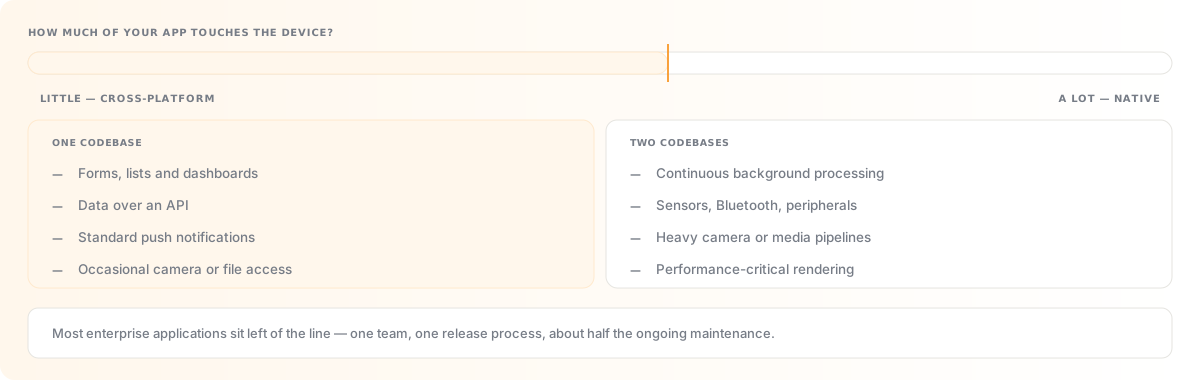
The choice is not ideological. It comes down to how much of your application touches device capability. Heavy camera work, background processing, sensors, Bluetooth peripherals or demanding performance argue for native. Forms, lists, dashboards and data over an API rarely do.
For most enterprise applications cross-platform is the better commercial decision: one codebase, one team, and roughly half the ongoing maintenance. We will tell you when your requirements fall the other side of that line.
- Offline-first behaviour, local persistence, queued actions and conflict resolution when the network returns.
- Background sync and notifications, working within each platform's increasingly strict background execution rules.
- Enterprise distribution; MDM, managed Play and private distribution without a public store listing.
- Device fleet realities, rugged scanners, kiosk mode and long OS support tails in warehouse and field settings.
- Store review readiness, privacy declarations, permission rationale and review notes prepared in advance.
- Release management, staged rollout, crash monitoring and over-the-air updates where permitted.
Design that starts by watching the work.
The most valuable hour in a design process is usually the first one spent watching somebody do the task as it exists today — including the spreadsheet they keep alongside the system and the workaround nobody documented.
Design is included in how we build rather than sold as a separate phase that hands over a set of static screens. Designers and engineers work in the same cycles, which is what prevents the gap between what was drawn and what is technically sensible.
- User research; interviews and observation with the people who will use it.
- Information architecture, getting the structure right before anything is styled.
- Interactive prototypes, tested with real users while changes are still cheap.
- Design systems, tokens, components and documentation, handed over as an asset you own.
- Accessibility by design; WCAG 2.2 AA considered in the design, not audited afterwards.
- Design QA through build, designers reviewing the built interface, not just signing off the mockup.
Frontend and mobile technologies we deliver in.
Each links through to how we use it and what we have built with it.
Frontend frameworks
The interface layer, chosen on your team's skills.
Mobile platforms
Native and cross-platform, decided on device requirements.
Cloud & DevOps
Hosting, pipelines and release management.
Before you build an application.
The three below are the ones this page does not already answer. Anything more specific, put it to us directly.
Do we need a mobile app, or is a responsive site enough?
Most organisations that ask this need a responsive site or a progressive web app, and are asking because a competitor has an app, not because a requirement demands one. An app earns its keep when you need genuine offline capability, device hardware, background processing, or push notifications that people will accept. It costs you two codebases, two release processes and a store review cycle that can hold a fix for a week. A progressive web app covers a surprising amount of the middle ground, installable, offline-capable, and updated the moment you deploy. We will look at what your users are trying to do and tell you which side of the line it falls.
How do you handle browser and device support?
By deciding it explicitly at the start, from your own analytics instead of a general standard. Supporting every browser back several years is a real and ongoing cost, and it is usually being paid for a fraction of a percent of traffic. We agree a support matrix from what your users actually use, then test against it automatically in the pipeline rather than manually before each release. Where an older browser matters (in some public sector and regulated contexts it does), we design for graceful degradation rather than pretending the constraint away.
Can you work with our existing designs or design team?
Yes, and it works best when your designers sit in the same delivery cycles rather than handing over finished artwork. The usual friction with a completed set of screens is that some of it assumes behaviour that is expensive or impossible, and the trade-offs get resolved by an engineer alone at build time. Where you have a design system already we build to it and contribute back. Where you have static mockups we will review them for accessibility and technical feasibility before we quote, which is usually the point at which the useful conversations happen.