
The language is the easy part. The execution model is the migration.
Node is a good destination for a ColdFusion application that is mostly data access and JSON endpoints, and a poor one for an application built around long synchronous request handling. The difference is worth establishing before anyone writes code.
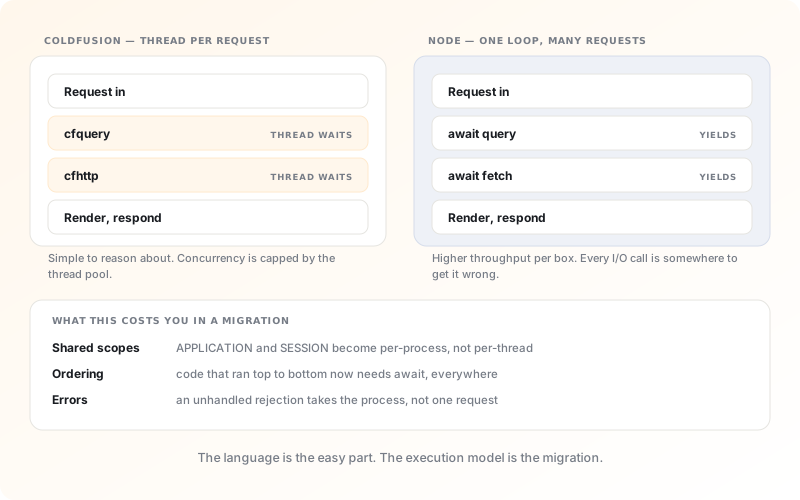
Node is the right answer for a specific shape of application.
If your ColdFusion application is essentially a set of screens over a database (read a query, render a table, accept a form, write a row), then Node handles that workload comfortably, and a team that already writes JavaScript on the front end gets to stop context-switching.
That single-language argument is real and under-rated. One toolchain, one package manager, one set of types shared between the API and the interface, and one hiring pool. For a team of four, that is a meaningful reduction in the number of things that have to be kept in somebody's head.
Where Node fits badly is the application that does substantial synchronous work inside a request: generating a large PDF, processing an uploaded spreadsheet, running a long report. ColdFusion's thread-per-request model absorbs that behaviour. Node's event loop does not — one such request degrades every other request on the process.
That work can be moved to a queue, and often should be regardless. But it is migration scope, and it is the scope most commonly discovered after the estimate has been accepted. We look for it during the assessment for exactly that reason.
Three translations, and the trap inside each one.
Queries become awaited calls; everywhere
<cfquery name="qUser" datasource="app">
  SELECT id, email FROM users
  WHERE  id = <cfqueryparam value="#id#"
               cfsqltype="cf_sql_integer">
</cfquery>

<cfquery name="qOrders" datasource="app">
  SELECT * FROM orders
  WHERE  user_id = <cfqueryparam value="#id#"
               cfsqltype="cf_sql_integer">
</cfquery>const [user] = await sql`
SELECT id, email FROM users
WHERE id = ${id}`;
const orders = await sql`
SELECT * FROM orders
WHERE user_id = ${id}`;
// or, since neither depends on the other:
const [[user], orders] = await Promise.all([...]);The trap: a CFML page runs its queries in sequence because it has no choice. Translated literally, that sequencing survives into Node and you inherit the latency without the simplicity. Independent queries should be parallel.
APPLICATION scope becomes a deliberate decision
<cfif not structKeyExists(application, "rates")>
  <cflock scope="application" type="exclusive"
          timeout="10">
    <cfset application.rates = loadRates() />
  </cflock>
</cfif>

<cfset rate = application.rates[currency] />// Fine on one process:
let rates: Rates | null = null;
async function getRates() {
return (rates ??= await loadRates());
}
// Correct once you run more than one:
const rates = await cache.get("rates",
{ ttl: 3600 }, loadRates);The trap: ColdFusion runs one application scope per server, and most teams run one server. Node is usually deployed as several processes behind a load balancer, so an in-memory cache is now per-process and quietly inconsistent.
onRequestStart becomes ordered middleware
<cffunction name="onRequestStart">
  <cfargument name="target" />
  <cfif not structKeyExists(session, "user")>
    <cflocation url="/login.cfm"
                addtoken="false" />
  </cfif>
  <cfset request.locale = resolveLocale() />
  <cfreturn true />
</cffunction>app.use(session(sessionOptions));
app.use(requireUser); // 401 or redirect
app.use(resolveLocale); // sets req.locale
app.use(auditLog);
// Order is the behaviour. Swap two of these
// and the audit log loses the user it was
// supposed to be recording.The trap: in CFML this is one function, so the ordering is implicit and obvious. Split into middleware, ordering becomes a design decision that is easy to get subtly wrong and hard to notice in testing.
Two questions decide this, not a language preference.
Plot your application honestly. Most CFML systems we assess land in the bottom-left or top-left quadrant, which is why we do not recommend Node by default.
Reports and documents, rendered server-side
Long-running work in a thread-per-request model. Node makes this harder before it makes it better. Choose .NET or Java, or move the work to a queue first.
Heavy processing behind an API
Node can front this, but the heavy work belongs in a worker, not the request path. That is a real piece of scope, budget it explicitly.
Screens over a database
The most common shape of CFML application, and a comfortable Node workload. One language across the stack is a genuine simplification here.
An API with a modern front end
Shared types between server and client, one toolchain, one hiring pool. If you are also replacing the front end, this is where Node earns its place.
ColdFusion included a lot. In Node, each of these is yours.
This is not an argument against Node. It is the part of the estimate that gets left out, and it is usually the difference between the quote and the invoice.
PDF generation
cfdocument was one tag. You now choose a renderer, run a headless browser or a native library, and own its output fidelity, its memory profile and its security updates.
cfmail with a configured server becomes a library plus a transactional mail provider, plus templating, plus retry and bounce handling that the tag was quietly doing.
Scheduled tasks
The CF Administrator's scheduler becomes a job runner or an external scheduler, with its own persistence, its own monitoring and its own answer to what happens when two instances both wake up.
Spreadsheets and Office output
cfspreadsheet becomes an npm dependency whose formatting fidelity you will be comparing against the old output, cell by cell, for longer than you expect.
Sessions across instances
CFML sessions lived in one JVM. Node behind a load balancer needs a shared store (Redis, usually) which is new infrastructure to run and monitor.
Dependency supply chain
You have traded one vendor's release cycle for several hundred packages with their own. That is a real operational responsibility, and it needs an owner named before you go live, not after the first advisory.
ColdFusion and Node, specifically.
Including the one we get asked least often and should be asked most.
Is Node fast enough to replace ColdFusion?
Almost certainly, and it is the wrong question. Both platforms are far quicker than the database call that dominates a typical request, so raw throughput is rarely what limits a business application. The performance question worth asking is about shape rather than speed: Node achieves its throughput by never blocking, so a single endpoint that does heavy synchronous work degrades every other request sharing that process, where ColdFusion would have isolated the damage to one thread. If your application has three endpoints like that, they need to move to workers, and that is scope. Get that right and Node will comfortably serve more concurrent users per box than the ColdFusion installation it replaced.
Should we use TypeScript?
Yes, and we would decline to deliver a migration of this kind without it. You are moving away from a loosely typed language partly because nobody can safely change it any more; arriving in another loosely typed language reproduces the original problem with newer syntax. TypeScript gives you the compile-time checking that makes a large codebase tractable, and it lets the same types describe the API and the front end, which removes an entire category of integration bug. The cost is a build step and some early friction for developers who have not used it. That cost is repaid within the first month.
We were told Node is unsuitable for enterprise applications. Is that true?
It is a generalisation that hides a real point. Node runs very large systems in production at organisations with far higher transaction volumes than most CFML applications ever see, so the blanket claim is not supportable. What is true is that Node gives you less by default: no opinion about how you structure an application, no built-in transaction management, no standard approach to configuration or dependency injection. On a disciplined team that freedom is an advantage. On a team without established conventions, or one distributed across several suppliers, it produces codebases that diverge quickly. If your organisation's honest answer is the second, .NET or Spring will serve you better, and that has nothing to do with the runtime.